
Screenshots that already say what's wrong.
Point at a window or drag a region, drop numbered markers, and write what is broken. Each marker becomes a numbered note in the Markdown you copy, so nobody has to guess which screenshot or which part of it you meant.
- Free to use
- Copy Markdown, export PDF
- No account, no telemetry
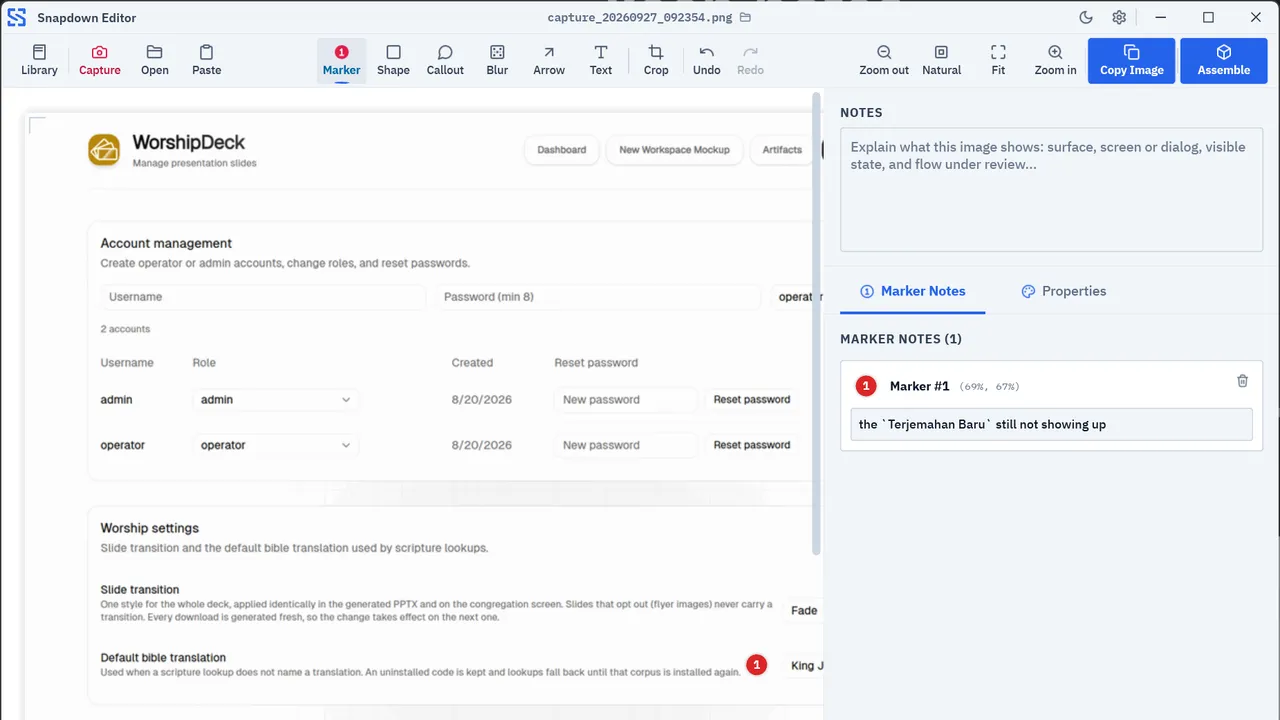
Twelve Things Snapdown Does
A Windows desktop app that captures any window, for developers and teams who report what is broken, with the evidence tied to the note instead of attached as loose files.
Window Detection
Win32 DWM extended frame bounds strip the transparent shadow Windows 11 draws around a window. Point at any window to outline its true visible edge and lock it with a single click, no manual dragging required.
Scroll to Widen
Walks the UI Automation tree up to 2 levels deep beneath your pointer. When nested controls exist, roll the mouse wheel to widen from button to panel or to the full window with the live Scroll to widen badge.
Pixel Loupe
Freeze the display and inspect exact pixel boundaries before cropping. A 20×20 loupe matrix magnifies alignment seams, container borders, and sub-pixel text rendering.
Marker N Is Note N
A marker on the screenshot and its numbered note in the Markdown are one pair. Marker 3 is note 3 under that finding, so an engineer or a coding agent does not have to guess.
Destructive Blur
Blur API keys, tokens, emails, and customer data before you hand a bundle over. A three-pass box blur is burned into the bundle's image, so the copy you share has no layer to undo. The original capture stays in your vault until you delete it.
Seven Annotation Tools
Seven tools on the toolbar: numbered markers, shapes for a focus box, callouts with a pointer tail, blur, arrows, free text, and crop. Annotations are drawn in the same red in light and dark themes.
One Markdown Bundle
A bundle gathers your findings. Copy its Markdown to the clipboard and paste it into an issue, a pull request, or an agent chat; copy a single image, with or without the annotations burned in; or export the bundle as a PDF.
PDF Export with Typst
Turn a bundle into a PDF with the Typst compiler built into the app, with no TeX or Node.js to install. The free version adds a small Snapdown mark at the bottom right, under the page number.
Image Size Presets
Downscaling presets (Sharp, Balanced, Agent Compact, and more) shrink a 4K capture before it is saved, which keeps the vault small and hands an agent a smaller image. How many tokens that saves is still experimental.
Local Vault and SQLite Library
All captures live in %USERPROFILE%\Pictures\SnapdownVault\ as ordinary PNG files. Findings, markers, and bundles are indexed in a small local SQLite database, and the images stay files you can open without Snapdown.
No Account, No Telemetry
Capture, annotation, and export run offline on your machine. No accounts, no analytics, no cloud uploads. The update check to wiradelta.com can be switched off in Settings.
Experimental
Hand-off to a Coding Agent
Pass a bundle to Claude Code, Cursor, or Windsurf by pasting its Markdown into the chat. Each marker note carries its position as a percentage of the image, so the agent knows where to look. We are still testing how well agents use it, and feedback is welcome.
Four Steps from a Visual Bug to a Finding Someone Can Fix
The same four steps every time, so a report reads the same whoever wrote it.
Capture
Hover to auto-detect windows and sub-panels via DWM frame bounds. Roll the wheel to choose your scope, click once to lock without dragging, and inspect pixel boundaries with the precision loupe.
Annotate
Drop numbered markers, callouts, arrows, and focus boxes. Each marker becomes a numbered note under its finding.
Redact
Cover API keys, customer emails, and sensitive tokens with a three-pass blur burned into the bundle's image. The original stays in your vault until you delete it.
Package
Copy the bundle's Markdown or a single image to the clipboard, or export the bundle as a PDF.
Marker 1 Is Note 1
Each marker on the capture is a numbered note in the Markdown, with its position recorded. Below is a real result: the image on the left, and on the right the Markdown that Copy Markdown put on the clipboard.
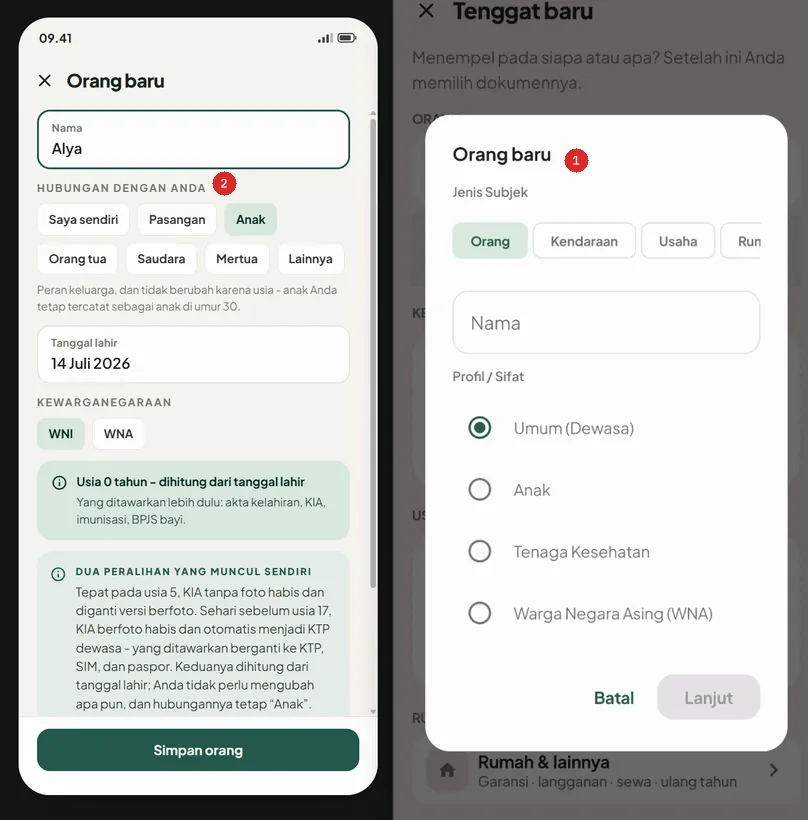
Each marker is burned into the image with its number, so the picture still reads on its own, outside the Markdown file.
# Review 2026-09-21 16:17
## Finding 1

### Notes
Screen adding new Person
### Marker Notes
1. [loc:71%,20%] Screen still not implementing new mockup/html design
2. [loc:28%,22%] When implementing, do not adopt relationship functionality
## Finding 2

### Notes
Screen of Brankas
### Marker Notes
1. [loc:33%,49%] Move button `Filter` to the left of button `Semua`Global shortcuts: Alt+Shift+S (Region) · Alt+Shift+E (Editor) · Rebindable in Settings
Storage, Network, and Shortcuts
Where your captures live, what leaves the computer, and what never runs in the background.
One Vault Folder, Plain Files
Captures live in %USERPROFILE%\Pictures\SnapdownVault\ as ordinary PNG files. Private on-device storage with no proprietary container. Move, back up, or inspect them whenever you want.
Turn Any Shortcut Off
Global shortcuts (Alt+Shift+S for Region Capture, Alt+Shift+E for Editor) can be remapped or turned off completely. When one is off, Snapdown no longer registers it with Windows, so the keys reach other apps as usual.
Delete Means Deleted
Deleting a finding from your library deletes its image file from disk as well. Nothing is left behind in a cache.
No Background Recording
Snapdown captures only on an explicit hotkey or button trigger. It never records your screen continuously or runs hidden background monitors.
An Update Check You Can Switch Off
On by default, once every 24 hours, Snapdown asks wiradelta.com whether a newer version exists. The request carries only the Snapdown version, Windows version, and processor architecture: no account, no device identifier, no telemetry. Switch it off in Settings → About and Snapdown sends nothing on its own.
Multi-monitor and Mixed DPI
Works across 4K displays and monitors with different scaling. The loupe reads the right pixels on every monitor.
Free to Use. Pro Removes the Mark.
Every feature is in the free download. Pro is the same app with one difference: PDFs you export carry no Snapdown mark.
| Feature | Free$0Free to use | Limited offer Pro |
|---|---|---|
| Capture, numbered markers, and notes | Included | Included |
| Blur, callouts, arrows, and focus boxes | Included | Included |
| Copy Markdown and copy image, never marked | Included | Included |
| PDF export | Small Snapdown mark at the bottom right, under the page number | No Snapdown mark |
| Updates | Included | Included |
| No account, no analytics | Included | Included |
| Coming soonWindows 11 · 64-bit | Coming soonEmail me when Pro is ready |
Markdown and clipboard output never carry a mark, in either version. PDFs exported before you activate keep theirs.
Before you install
SmartScreen and verification
Every release ships with a SHA256SUMS file, so you can check that the installer you download is the one published on GitHub. Snapdown is not code-signed yet, so Windows SmartScreen may warn about an unknown publisher the first time you run it. Choose More info, then Run anyway, or install through Scoop, which checks the hash for you.
What it needs
Tested on Windows 11 (64-bit). The setup installer places Snapdown in your user environment without requiring Administrator privileges or background services.
License and EULA
Snapdown is free to use for personal and commercial work. Pro is an optional one-time license that removes the mark from exported PDFs. By downloading, you agree to the Snapdown EULA.